
How to Add Money to Fire Kirin Account, Deposit & Withdrawal Guide
If you want to know how to add money to Fire Kirin account so you can actually play, here's the short answer: you don't deposit inside the Fire Kirin app. The app has no cashier, no deposit button, and no withdrawal option. Everything money-related happens on your distributor's website, the person or platform you got your account from (for example, casinoze.com). You add money to your distributor wallet, then tap "Add Score" in the game to move credits in. When you're done, you go back to the distributor site to redeem and withdraw.
That's how it actually works, and most other guides on the internet get this wrong. They show fake in-app cashier screens that don't exist in the real app. This guide is based on the real flow, step by step, so you don't waste time looking for buttons that were never there.
Why the Fire Kirin App Has No Deposit Button
Let's get the biggest misconception out of the way first, because it's what confuses almost every new player.
Fire Kirin is a game client, basically the table you sit at. The money side of the operation is handled by a distributor, who runs a separate website and gives you a game login. This is by design. It's the same reason you can't put cash into a slot machine's screen: the machine is the game, and the cashier is somewhere else.
So if you've been tapping around the Fire Kirin app looking for a deposit or withdrawal option, you can stop. You won't find one, and no update will add one. That's not how the system is built.
Key facts to remember:
- Your Fire Kirin game login is created by a distributor, not by you registering in the app.
- Deposits go into your distributor wallet, not into the app.
- "Add Score" in the game is the bridge that moves credits from your wallet into the game.
- Withdrawals go through the distributor's site (Redeem), not through the app.
How to Add Money to Fire Kirin Account: Step by Step
Here is the full deposit walkthrough, in the order it actually happens. Follow it once and you'll never have to think about it again.
Step 1: Create an Account on Your Distributor's Site
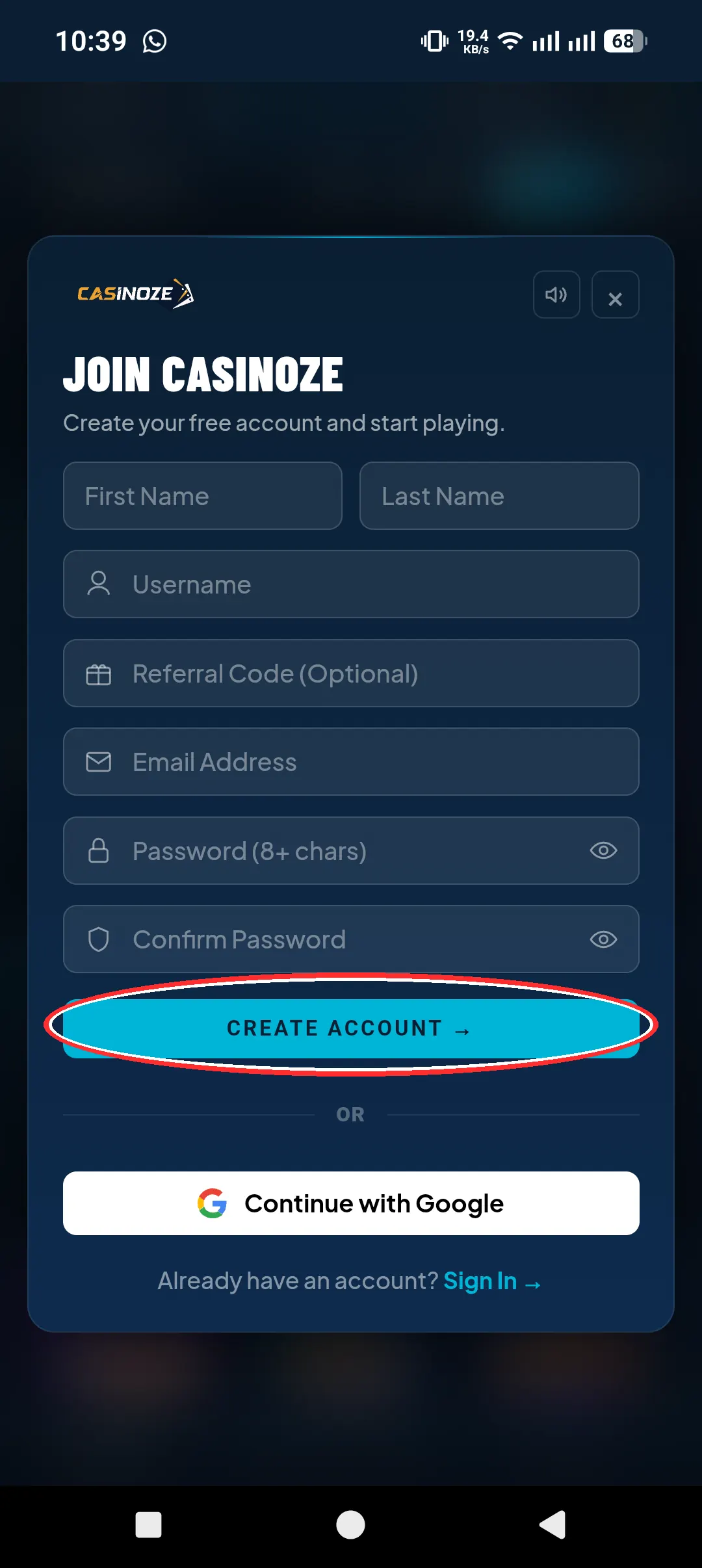
Before you touch the Fire Kirin app, you start on the distributor's website. Using casinoze.com as the example: go to the site, sign up with your details, and create your distributor account.
This is the account that holds your money. Everything financial, deposits, bonuses, withdrawals, lives here. Treat it like your wallet for Fire Kirin.
Step 2: Get Your Fire Kirin Game Login from the Distributor
Now click the Fire Kirin game on the distributor's site. Inside its interface, you'll see a "Create Account" option. Click it, and the distributor generates your Fire Kirin game login, a username and password for the game itself.
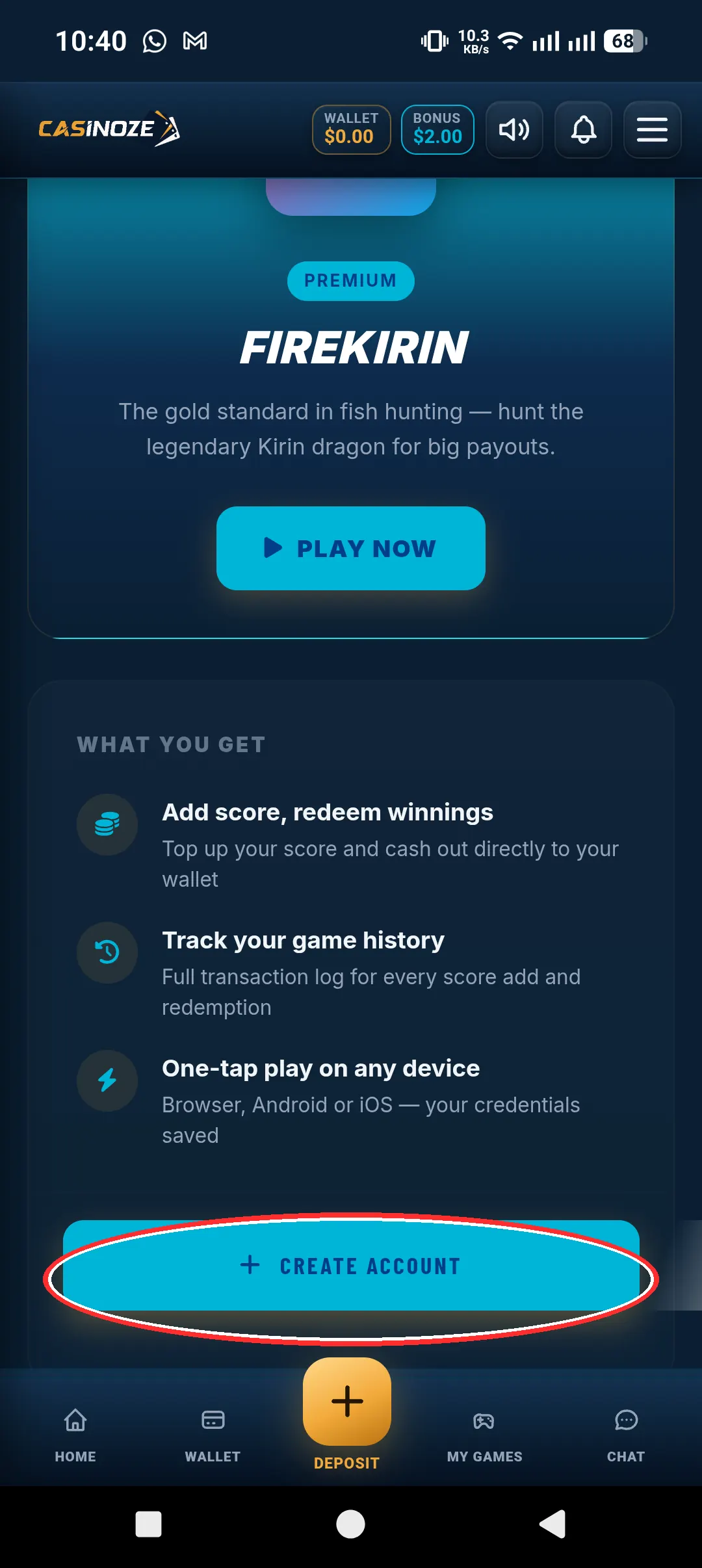
This is important: this is the ONLY way a Fire Kirin account gets created. You can't register a Fire Kirin account inside the app, on Google Play, or anywhere else. If someone tells you they can sell you a standalone Fire Kirin account with no distributor attached, walk away.
Write down your game login and keep it somewhere safe. You'll use it every time you open the app.
Step 3: Deposit Money into Your Distributor Wallet
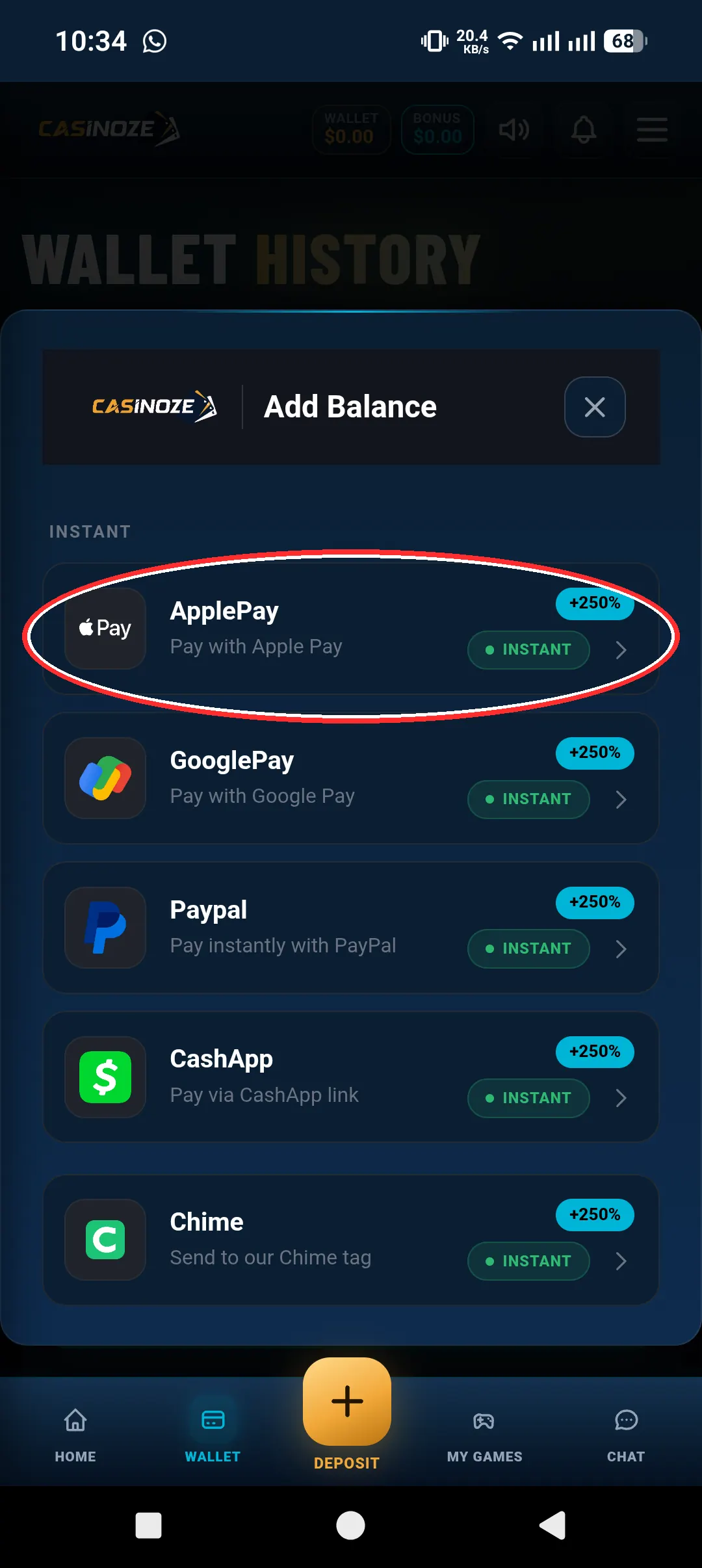
Now add money. Log in to the distributor's site, open the wallet or cashier section, and deposit. Payment options vary by distributor, but this is where your real money goes in.
One thing to know up front: deposit bonuses of up to 250% run regularly. So a deposit can come with a big credit boost attached, depending on whatever promotion is active when you deposit. We'll break the bonuses down further below.
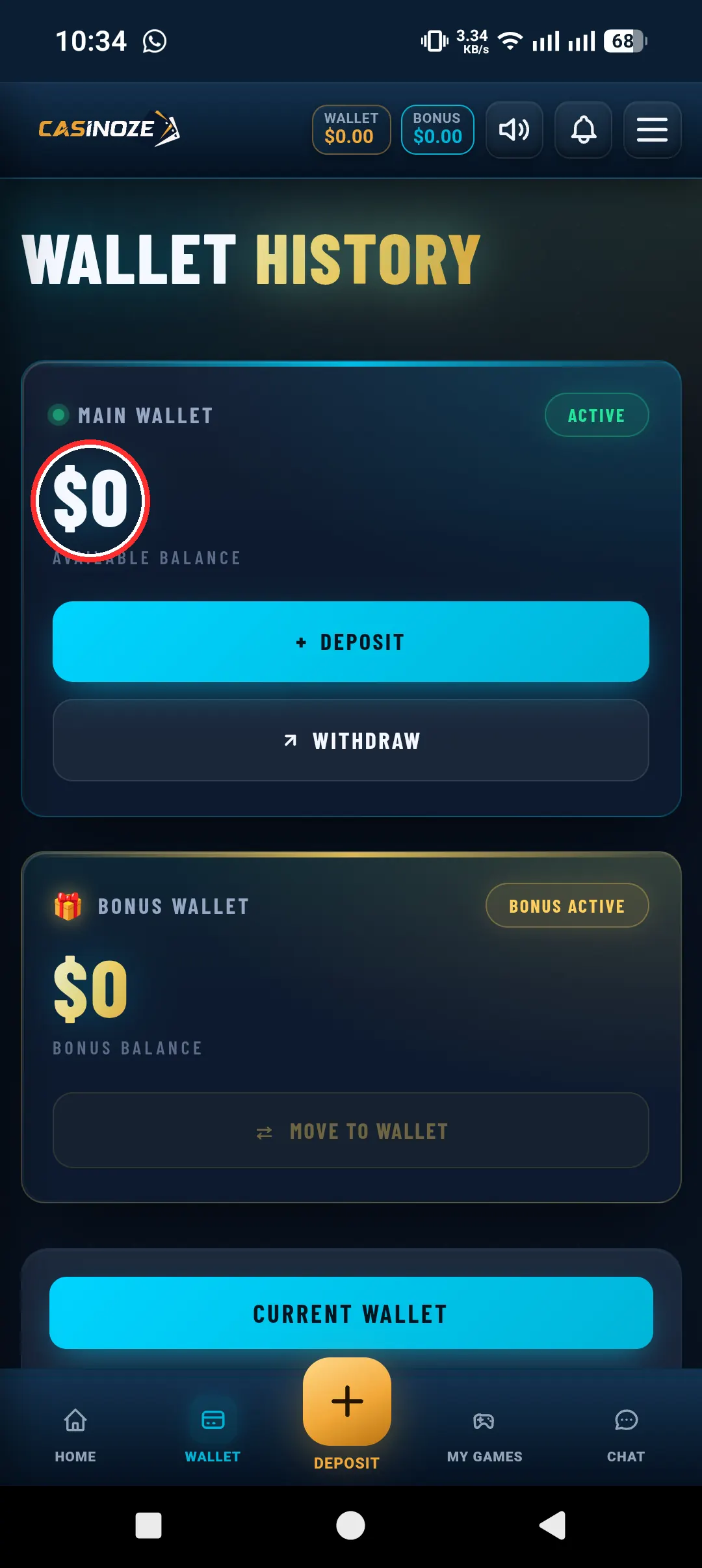
Step 4: Open the Game and Tap "Add Score"
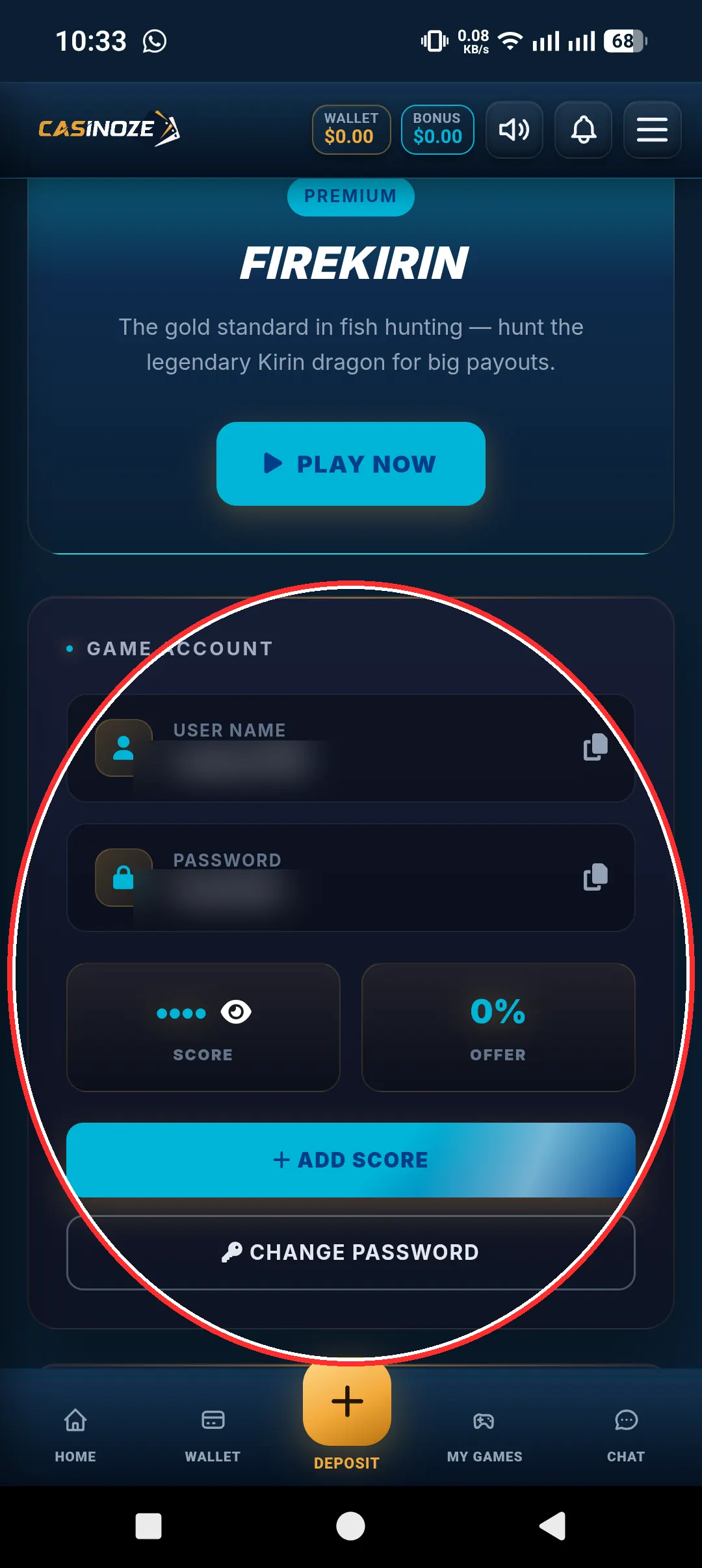
With balance sitting in your distributor wallet, open the Fire Kirin app and log in with the game credentials the distributor gave you. Then tap "Add Score", that's it. Your credits transfer from the wallet into the game automatically.
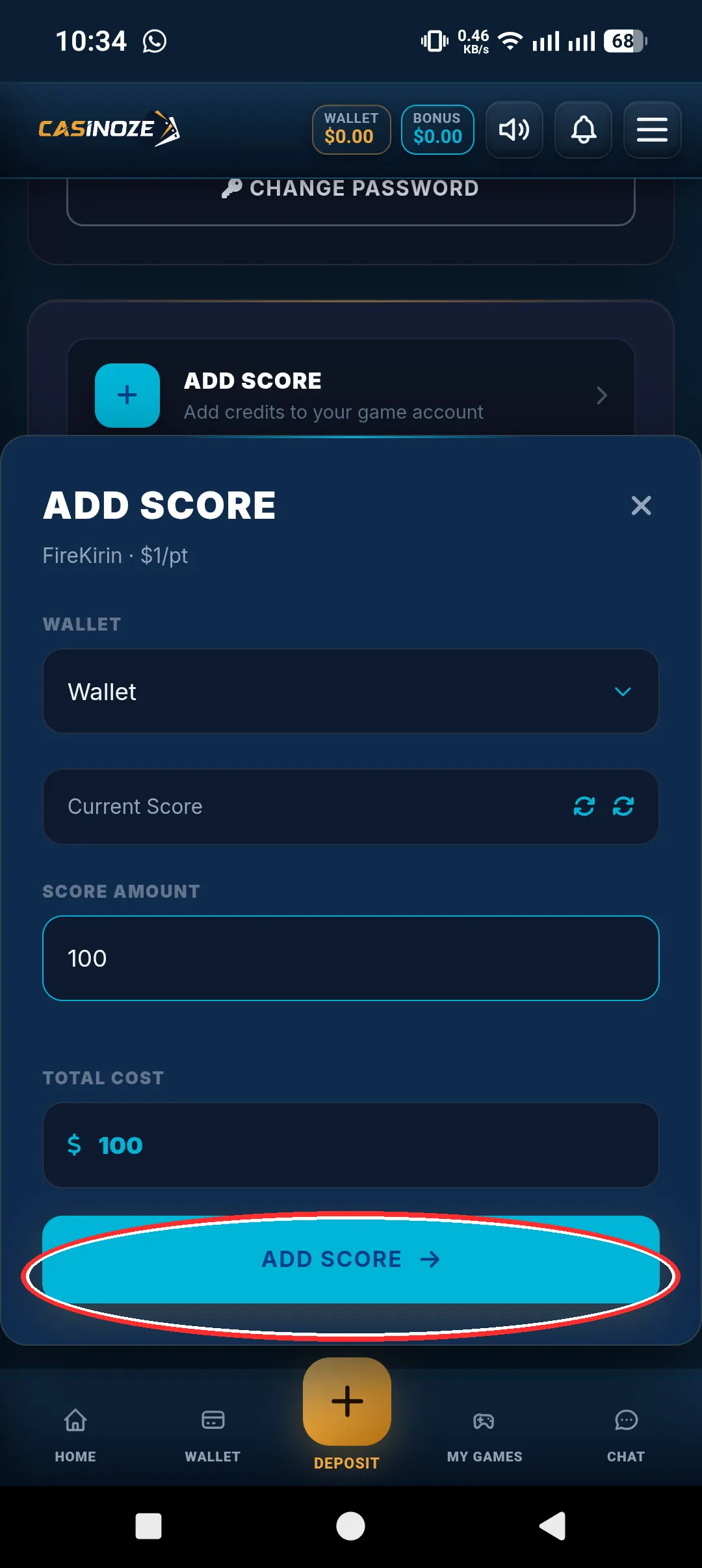
This is the single step people miss. The "Add Score" button is the entire deposit mechanism inside the game. There's no separate top-up screen, no card entry, no payment flow inside the app. It just pulls credits from the wallet you already funded on the distributor's site.
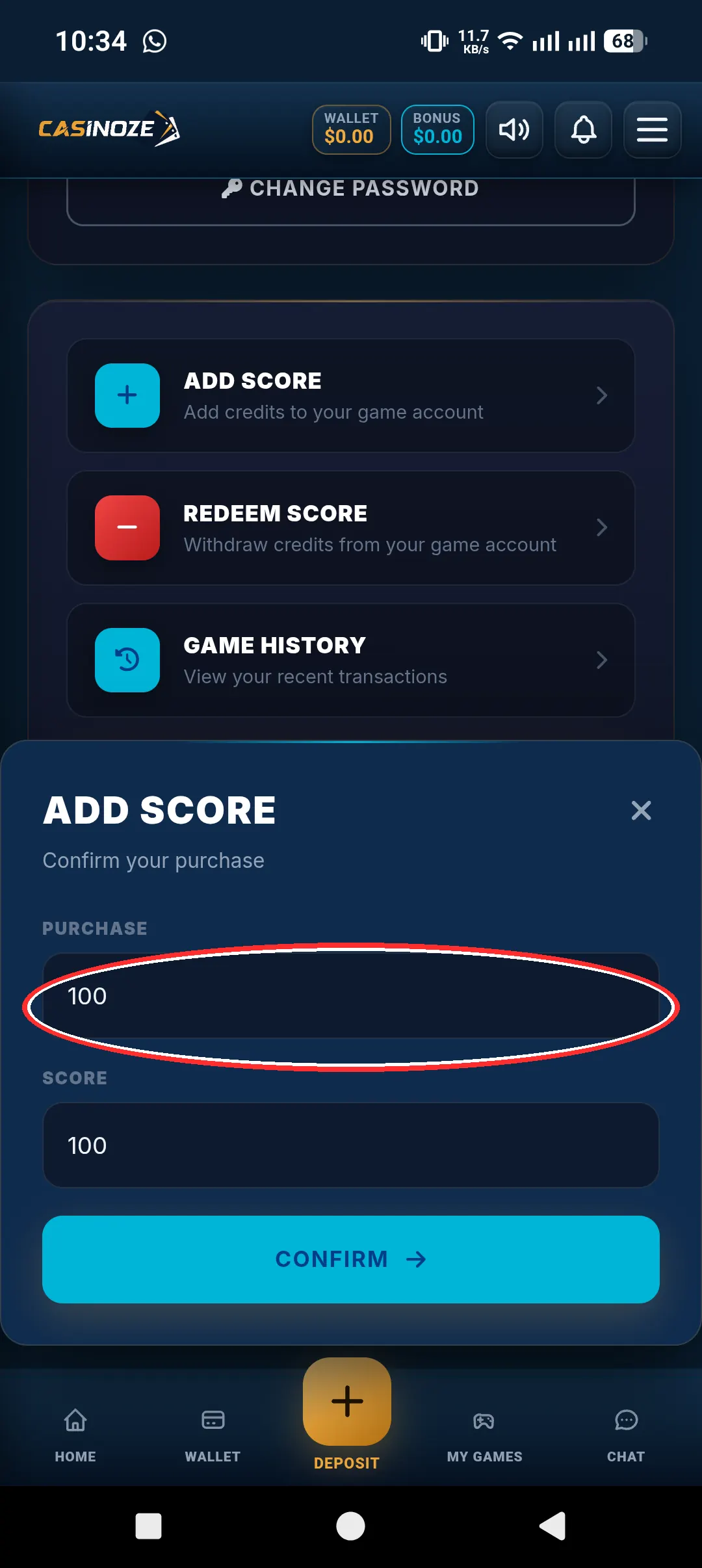
Step 5: Log In and Play
You're in. Your credits are loaded and you're at the tables. Play fish games, play slots, your credits are your credits now, same as tokens at any arcade.
Step 6 (Later): To Withdraw, Go Back to the Distributor Site
When you want to take money out, you don't do it in the app, same rule as deposits. Go back to the distributor's site or app, head to the Redeem section, and your game credits move back into the distributor wallet. From the wallet, you withdraw.
How to Cash Out on Fire Kirin: The Full Walkthrough
Since that's the question that causes the most confusion, let's slow it down and go through the cash-out side in detail. It's the mirror image of depositing, but there are a couple of things to watch.
1. Decide How Much You Want to Take Out
Your credits are sitting in the game. Decide how much of that you're cashing out. There's no rule that says you have to take it all, you can redeem part of your balance and leave the rest to keep playing.
2. Go to the Distributor's Site or App
Leave the Fire Kirin app and open your distributor's website or app, the same place where you created your account and deposited. This is where every money move happens.
3. Open the Redeem Section
Look for the Redeem option. This is the withdrawal mechanism. When you redeem, your credits move from the game into your distributor wallet. Think of it as cashing in your tokens at the arcade counter.
4. Withdraw from the Wallet
Once the credits are in your wallet, you can withdraw. The actual payout method and timing vary by distributor, some move fast, some take longer, and minimums differ from one distributor to the next. We say that because it's true: any guide that gives you a specific dollar amount or a guaranteed payout time is making it up.
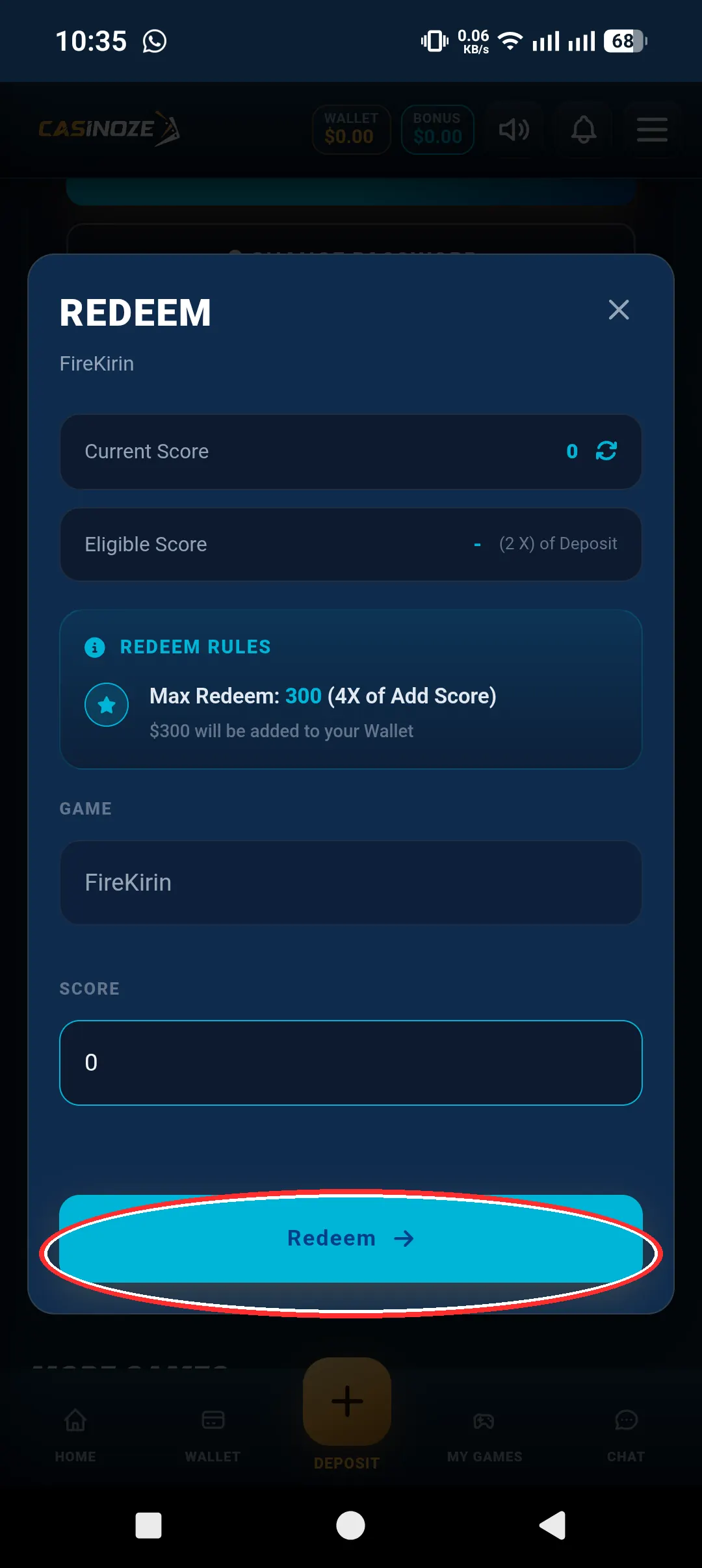
5. Wait for Processing
After you submit a withdrawal, it goes into processing. How long that takes is one of the most common questions, so let's be straight: it varies by distributor. It depends on their process, the payout method, and how busy they are. If speed matters to you, ask your distributor about their typical timeline before you deposit, a good distributor will give you a straight answer.
Deposit Bonuses Explained
Bonuses are a big part of the Fire Kirin economy, and they're worth understanding before you deposit, because the right timing can more than double your credits.
What "Up to 250%" Means
When a distributor says deposit bonuses up to 250% run regularly, it means your deposit can come with extra credits on top. Deposit a base amount, get bonus credits added to it. These offers rotate, daily specials, weekend boosts, reload bonuses for existing players, so the exact offer changes from week to week.
How Bonuses Land in Your Wallet
Bonus credits go into the same distributor wallet as your deposit. When you tap "Add Score" in the game, the combined balance moves into the game as credits. There's nothing separate to claim inside the app.
What to Watch Out For
Honest advice from someone who's seen this game a lot:
- Ask about terms before you deposit. A 250% headline is only meaningful if you know what comes with it. A straight distributor will spell it out.
- New-player bonuses are usually the best ones. If you're signing up for the first time, that's when the strongest offers tend to show up.
- Bonuses can change. What's running this week might not be running next week. Don't plan your deposit around an offer you saw a month ago, check what's live.
- Bonuses aren't free money. They're extra credits to play with, and they carry terms. Treat them as a boost, not a guarantee.
Minimum Deposits and Withdrawal Limits: What We Actually Know
This is where a lot of guides invent numbers to look authoritative. We're not going to do that.
Minimum deposit amounts, minimum withdrawals, and maximum payouts vary by distributor. There is no single official number for Fire Kirin, because Fire Kirin itself doesn't process money, each distributor sets their own rules. If a guide gives you a specific dollar figure and claims it applies to everyone, that guide is guessing.
What you should do instead: ask your distributor directly before your first deposit. Any legitimate distributor will tell you their minimums and limits up front, no games. If they dodge the question, that's a red flag, and a reason to find a different distributor.
Common Problems and How to Fix Them
"I deposited but my credits aren't showing in the game."
Almost always, this means you skipped the "Add Score" step. The money is in your distributor wallet, it doesn't move into the game by itself. Open the game and tap "Add Score" and the credits transfer.
"Add Score isn't doing anything."
Make sure you're logged in with the game credentials your distributor gave you, not your distributor website login. Those are two different accounts. If the credentials are right and it still won't pull credits, contact your distributor, the wallet-to-game link is on their end.
"I can't find a deposit option in the app."
Correct, there isn't one. The app has no deposit or withdrawal options. Deposits happen on the distributor's site. If you were hunting through the app's menus, now you know why you came up empty.
"My withdrawal is taking a long time."
Withdrawal timing varies by distributor. Check whether they've given you an estimated timeline. If you're past it with no update, contact their support. For next time, pick a distributor known for faster payouts, and ask about timelines before you deposit, not after.
Safety Tips for Your Money
Let's be real: you're moving real money through a distributor, so protect yourself like it.
- Stick with one reputable distributor. Don't scatter money across five different sites chasing bonuses. Pick one with a track record and build a relationship.
- Never share your game login. Your distributor creates it for you, but they don't need your password afterward. Nobody legit will ask for it.
- Screenshot your transactions. Deposit confirmations, redeem requests, withdrawal submissions, keep records. If a dispute ever comes up, screenshots are your proof.
- Test with a small amount first. New distributor? Deposit small, play a little, redeem a little, withdraw a little. If the whole loop works smoothly, then deposit more.
- Watch out for fake apps and fake distributors. The real Fire Kirin app has no cashier, so if an "app" or a website asks you to enter payment details directly into a Fire Kirin game client, it's not the real thing.
- Keep your distributor account secure. Use a unique password for the distributor site. That's where your money lives.
How This Compares to Other Fish Games
If you're coming from other sweepstakes fish games, the distributor model might feel unfamiliar, but it's actually the standard setup across this whole category. The money flows through an intermediary and the game is just the game. What makes Fire Kirin's version clean is the "Add Score" button: one tap, credits move, no fumbling with transfer forms. The redeem side works the same way in reverse. Once you've done the full loop once, deposit, add score, play, redeem, withdraw, it becomes second nature.
Quick Recap: The Whole Money Flow
- Deposit: Distributor site → wallet → open game → "Add Score" → credits in the game.
- Play: Log in with your distributor-generated game credentials and play.
- Withdraw: Distributor site → Redeem → credits back to wallet → withdraw.
- The app itself: No deposit, no withdrawal, no cashier. Ever.
- Bonuses: Up to 250% deposit bonuses run regularly, check what's live before you deposit.
- Minimums and timelines: Vary by distributor. Ask before you deposit.
Frequently Asked Questions
How do I add money to my Fire Kirin account?
Create an account on your distributor's website (like casinoze.com), get your Fire Kirin game login generated there, and deposit money into your distributor wallet. Then open the Fire Kirin app, log in with your game credentials, and tap "Add Score", your credits transfer from the wallet into the game automatically. The app itself has no deposit option, so everything starts on the distributor's site.
What is the minimum deposit for Fire Kirin?
It varies by distributor. Fire Kirin itself doesn't set deposit minimums because it doesn't process money, each distributor sets their own rules. Ask your distributor what their minimum is before you deposit.
How do I cash out on Fire Kirin?
Go to your distributor's site or app, open the Redeem section, and move your game credits back into your distributor wallet. Then withdraw from the wallet. There's no withdrawal option inside the Fire Kirin app, the cash-out always goes through the distributor.
How long does a Fire Kirin withdrawal take?
It varies by distributor. Processing speed depends on the distributor's process and payout method. Ask your distributor about their typical timeline before you deposit, and use a small test withdrawal when trying a new distributor.
Is it safe to add money to Fire Kirin?
The mechanism itself is straightforward, money goes to your distributor wallet, not the app. Safety comes down to choosing a reputable distributor: one who answers questions about minimums and timelines up front, processes withdrawals without drama, and has other players vouching for them. Test with a small deposit first, keep transaction screenshots, and never share your game login.
Why can't I find a deposit button in the Fire Kirin app?
Because there isn't one. The Fire Kirin app has no deposit or withdrawal options by design, the money side is handled entirely by the distributor's website. You deposit into the distributor wallet and tap "Add Score" in the game to pull the credits in.
Do Fire Kirin deposit bonuses really go up to 250%?
Deposit bonuses of up to 250% run regularly, but the exact offer changes from week to week, daily specials, weekend boosts, and new-player offers rotate. Check what's live with your distributor before you deposit, and ask about the terms attached to any bonus.
Can I create a Fire Kirin account without a distributor?
No. Your Fire Kirin game login is generated by a distributor, you click the game on their site, click "Create Account," and they create it. This is the only way a Fire Kirin account gets created. Anyone offering to sell you a standalone Fire Kirin account with no distributor attached is running a scam.